Augmented Reality Design
During week three, we have been experimenting with image tracking techniques to create AR experiences that can be viewed via a mobile device.
Image tracking is a technique which requires a ‘trigger’ image – this can be anything as long as it meets the correct standards for the image tracking software. Usually, your trigger image should not use too much blank space, repetitive patterns or low contrast palettes. This is because the software picks up on obvious key points within an image, meaning more detail is favored when creating a trigger image.
According to the Zapworks website, a successful tracking image should include these three qualities:
- An image
- A CTA to indicate how users can activate the trigger
- A trigger (such as a QR code) which activates the content when scanned
(Zapworks, 2024)
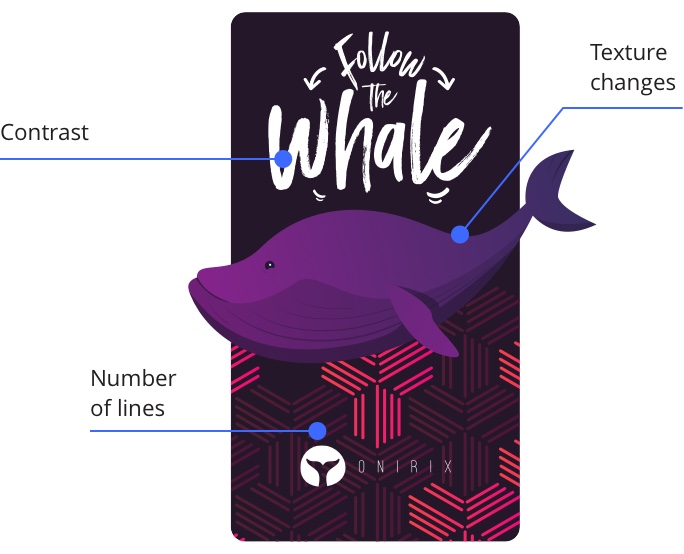
To create the experience, we had to start in Unity to set up a WebGL sequence and to train our image for tracking. The process is pretty straightforward and with a few simple add-ons, you can create a trigger out of almost any image. Designing in WebGL format results in web-based content that can be accessed by P.Cs, Apple and Android, so the results are versatile and inclusive to a wide range of users.
As I am new to Unity, I first tried following the tutorials up on Canvas. The first tutorial demonstrates the basics of creating a 3D image, before showing you how to apply similar techniques to bring in animated assets, which hover over the trigger image.
To host the experience online, I uploaded the Unity files to Zapworks, which provides a ‘Zapcode’ trigger that users can point their mobile device at and aim at the tracker image, which then displays the AR experience.
I then focused on using the techniques I learnt to make my own AR experience. For my tracker image, I used a photo of the sea which has clear distinction and moderate contrast. I also resized the aspect ratio to a standard resolution to avoid confusing the image trainer.
Once I had trained the image, I brought in my own 3D model of a duck that I made in Blender. My plan was to have the duck hover over the image as if it is in the water. Initially, I had some issues where the experience wouldn’t load, or the duck was not anchored to the tracker image. I retraced my steps and discovered that I had not set my files up correctly. I also learnt that importing Blender files requires you to fix the rotation of models imported into Unity. After resolving these issues, I had successfully created my own AR experience.
Surface tracking uses similar techniques to image tracking, except the software identifies and maps planes to then project items onto them. A practical example of this is IKEA, who allow users to ‘try out’ furniture in their homes, projecting to-scale models of furniture into the room of the user via device cameras. This can be beneficial to users who are unsure on how an item may look amongst other pieces of furniture. Users with disabilities which make it difficult for them to measure spaces may also find this feature useful as they can see if the items will fit within spaces of their home.
“AR bridges the gap between online and offline experiences in retail. Augmented reality experiences can be deployed in-store and online, creating a seamless and more connected experience for customers.” (Reydar, 2024)
Implementing AR into retail can lead to more informed decisions when choosing and purchasing a product, leading to a more positive customer experience and encouraging them to return. Additionally, it can set your brand apart from others, adding an innovative edge and memorable experience.
There are a few UX principles to consider when designing an experience for AR.
First of all is accessibility – can all users access your experience? For example, when creating an experience through Zapworks, you must consider the size and loading times of your experience. Not all users will have the most up-to-date device, or access to powerful Wi-Fi – both of which can affect loading times. Studies have suggested that users should be able to understand the purpose and content of a design within 10 seconds, or they may be inclined to leave your experience (Nielsen, 1993).
It is also good practice to test your experience across different devices to ensure compatibility. Before creating your experience, you should consider who will be using it? Where and how will they access it? Thinking of this ahead of time helps you to design a more inclusive and accessible experience with less complications later on.
“There are nuances between different models and OS versions, which can affect how your experience is displayed, but testing an example on each is at least a good start.” (Mather, 2019)
References:
Mather, David (2019) How to optimize AR for better UX [Article]. Available online: https://www.zappar.com/blog/optimizing-ar-better-ux/ [Accessed: 16/10/2024]
Onirix (2024) Image and Surface tracking [Image]. Available online: https://www.onirix.com/learn-about-ar/marker-based-augmented-reality-with-targets/ [Accessed: 16/10/2024]
Reydar (2024) Augmented Reality Retail: Stats, Benefits & Examples [Article]. Available online: https://www.reydar.com/augmented-reality-retail-stats-benefits-examples/ [Accessed: 16/10/2024]
Zapworks (2024) What Makes a Good Tracking Image? [Article]. Available online: https://docs.zap.works/general/design/what-makes-good-tracking-image/ [Accessed: 16/10/2024]